Dualtron P settings: What They Control and Why They Matter
Dualtron P settings control much more than a speed number. They change how your scooter starts, accelerates, brakes electronically, displays information, saves battery, and shuts down. This article expands on the demonstration from LOCO Scooters, whose video, Dualtron Electric Scooters: P-Settings Explained, provides the original reference.
At approximately 00:00, the creator explains that you access the menu by pressing and holding the mode button. Stop completely before making any change. Photograph or write down every original value first; that simple record gives you a reliable way back if a setting produces jerky acceleration, unusual braking, or an error.
According to LOCO Scooters, P0, P1, P2, and P3 are fixed settings associated with technical information that riders generally should not alter. The remaining options are more practical: P4 selects units, P5 chooses zero-start or kick-start, P6 controls cruise control, P7 adjusts initial response, and P8 limits maximum output.
These Dualtron P settings may not look identical on every scooter. Menu labels, available ranges, LCD layouts, firmware, and regional specifications can differ between Dualtron models, so your model-specific manual takes priority. The video is a useful starting point, not permission to copy values blindly from another machine.
For a setup, treat every change as a controlled experiment: alter one value, test at low speed in a legal open area, and record the result. The video shows the menu sequence clearly, while your own manual confirms what each displayed value means. That combination makes Dualtron P settings safer and easier to understand.
Video reference: LOCO Scooters’ explanation begins at approximately 00:00, with menu access around 00:10 and the fixed P0–P3 warning around 00:15.

TL;DR: The Dualtron P settings Worth Checking First
The most useful Dualtron P settings are P4 through PD. P4 selects km/h or mph; P5 chooses zero-start or kick-start; P6 enables or disables cruise control; P7 changes startup response from to 5; P8 sets maximum output from to 100; P9 offers battery-saving levels 1, 2, or 3; PA controls electronic braking from to 5; PB sets LCD brightness from to 5; PC selects automatic shutoff from to minutes; and PD switches ABS on or off where fitted.
A sensible beginner profile is km/h, kick-start, cruise control off, moderate P7, moderate P8, conservative PA, medium PB, a short PC timeout, and ABS enabled only when the scooter has a functioning ABS system. This reduces accidental launches and gives you time to learn throttle and brake behavior.
For commuting, prioritize predictable acceleration, readable display brightness, battery preservation, and reduced accidental starts. A commuter profile might use kick-start, low-to-moderate P7, moderate P8, P9 level if the manual confirms its operation, PA at a middle setting, and cruise control off around pedestrians, traffic, hills, and wet surfaces.
- Change one value at a time.
- Test on flat ground before testing hills.
- Keep a reserve instead of relying on advertised range.
- Never use settings as a substitute for a helmet, correct tire pressure, mechanical brake checks, or local-law compliance.
These Dualtron P settings can make behavior more predictable, but they cannot improve worn brake pads, damaged tires, poor visibility, or unsafe judgment. According to the creator, the menu is for personalizing the ride; it is not a replacement for riding skill.
In our experience, the safest first adjustment is usually P5, followed by a restrained P7 and P8. Reassess after several short rides rather than chasing maximum acceleration immediately. That approach turns Dualtron P settings into a setup tool rather than a source of surprises.
The Complete Dualtron P Settings Reference
The table below follows the ranges described by LOCO Scooters at approximately 00:20–01:05. Exact behavior can vary, so confirm each value in your manual before changing it. The creator identifies P0–P3 as fixed, while P4–PD are the settings riders are most likely to use.
| Setting | Range or choice | Function | Safe starting recommendation |
|---|---|---|---|
| P0–P3 | Model-specific/fixed | Technical values and display-related information | Do not change without documentation |
| P4 | km/h or mph | Speed unit | Use the unit familiar to you |
| P5 | Zero-start or kick-start | Determines whether throttle starts from rest | Kick-start for beginners |
| P6 | On/off | Cruise control | Off until thoroughly familiar |
| P7 | 0–5 | Initial acceleration response | Low or moderate |
| P8 | 5–100 | Maximum motor output | Moderate, not 100 |
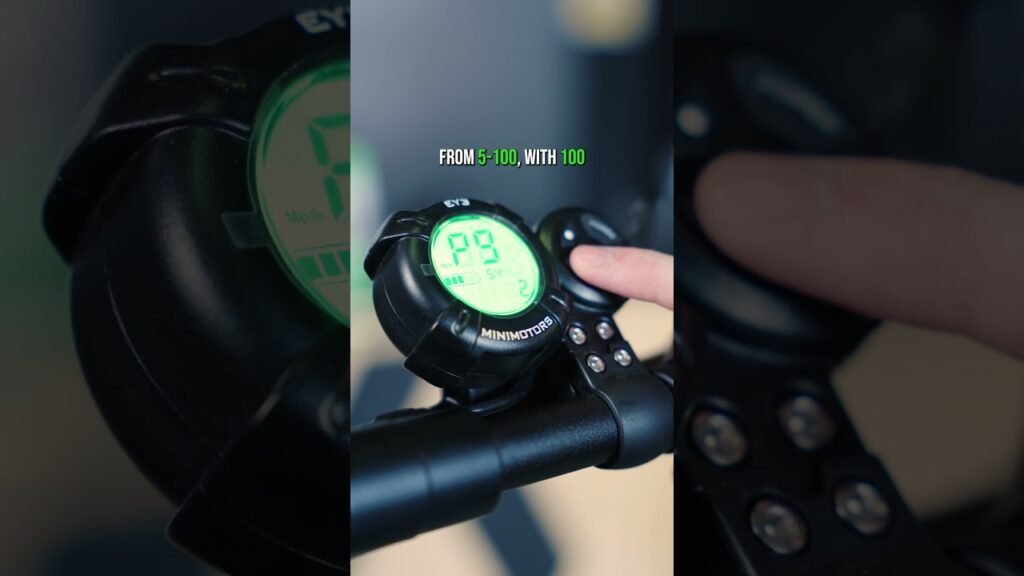
| P9 | 1–3 | Battery-saving level | Use the manual’s recommended level |
| PA | 0–5 | Electronic braking power | Low or moderate |
| PB | 0–5 | LCD brightness | Readable middle setting |
| PC | 1–30 minutes | Automatic shutoff | Short interval when parked |
| PD | On/off | ABS function | On when correctly fitted and functional |
P4 deserves care because changing from kilometers per hour to miles per hour changes how you interpret speed and legal limits. P5 kick-start requires an initial roll before motor engagement, which is generally safer in crowded areas. P6 cruise control can be risky near traffic, pedestrians, hills, wet pavement, or obstacles because speed may continue until the system disengages.
LOCO Scooters describes P7 as startup strength from zero to five and P8 as maximum output from five to 100, with representing absolute maximum output. They are not the same: P7 affects how quickly power arrives, while P8 sets the ceiling. A higher P8 can increase acceleration, current draw, heat, and traction demands.
P9 levels 1–3 may reduce output or otherwise conserve battery, but the exact intervention differs by model. PA changes electronic-braking feel; it does not repair mechanical brakes. PB brightness ranges from 0–5, PC can shut the display down after 1–30 minutes, and PD is an on/off ABS control. These Dualtron P settings are electronic choices, not replacements for hardware inspection.
Use this Dualtron P settings reference as a map, then verify your scooter’s actual menu. The creator’s explanation is especially useful for understanding the order and purpose of the controls, while the manual supplies model-specific limits. Never assume that a value shown on one LCD display behaves identically on another.

How to Tune Acceleration, Output, and Braking Safely
The central tuning distinction is simple: P7 controls how quickly power arrives at startup, while P8 controls the maximum output ceiling. A high P7 can make the first throttle movement abrupt even when P8 is moderate. Conversely, a low P7 with P8 at may feel gentle initially but still deliver substantial power once the scooter is moving.
- Record the baseline values and lower only one setting.
- Choose an empty, flat, legal area with clear visibility.
- Test a straight-line launch at walking speed, then release the throttle.
- Test a controlled stop using both brakes progressively.
- Check for wheel slip, nose-dive, delayed response, heat, or unusual noise.
- Increase the changed value by one step only if the lower setting is insufficient.
This routine is more informative than judging acceleration from a standstill in traffic. In our experience, small changes can feel larger than the numerical scale suggests, particularly on high-output dual-motor scooters. Leave several minutes between repeated tests so the controller and motor do not accumulate unnecessary heat.
PA electronic braking affects deceleration and weight transfer, but stronger electronic braking does not automatically mean a shorter or safer stop. Excessive regeneration can shift your balance forward, alter rear-wheel grip, or feel unpredictable on wet surfaces. Mechanical brakes remain essential because they provide the primary stopping hardware.
PD ABS, when fitted, is a wheel-lock prevention aid—not a license to brake late. It cannot overcome excessive speed, worn tires, loose gravel, standing water, or a failed mechanical brake. Wear a helmet, gloves, eye protection, knee and elbow protection, high-visibility clothing, front and rear lights, and reflective elements.
Practice progressive braking with both brakes, keep your body centered, avoid abrupt steering while braking, and leave extra distance on wet or loose ground. The Dualtron P settings video explains the controls; your practice must teach your hands how the scooter actually responds. Treat the Dualtron P settings as adjustable behavior, not as a guarantee of safety.
Battery Saving, Range, and Everyday Ride Comfort
P9 offers battery-saving choices 1, 2, and according to the creator’s demonstration, but the exact intervention may differ between models. It might limit output, alter response, or change another battery-management behavior, so read the relevant manual before selecting a level. A setting that saves energy on one Dualtron may not operate identically on another.
Real range depends on far more than the advertised battery figure. Rider and cargo weight, speed, hills, temperature, tire pressure, wind, surface quality, and stop-start traffic all matter. A heavier rider climbing repeated hills at high speed can use substantially more energy than a lighter rider traveling steadily on flat pavement, even with the same battery.
P8 also affects consumption. Repeated high-power launches draw more current and can increase motor, controller, and battery heat. Moderate output and smooth throttle use usually produce a calmer ride and more usable range than repeatedly selecting maximum output.
PB brightness affects daytime readability and convenience; use enough brightness to read the screen without unnecessarily draining energy. PC’s 1–30-minute automatic shutoff helps prevent accidental battery drain when the scooter is parked, especially if the display is left on in a garage or at a café.
- Charge according to the manufacturer’s guidance.
- Inspect tire pressure before longer rides.
- Use moderate acceleration and avoid unnecessary top-speed travel.
- Plan a reserve instead of treating advertised range as guaranteed.
- Keep service and charging records.
Those records can reveal declining capacity, rising charging costs, or the eventual need for a replacement battery. Total ownership includes electricity, maintenance, tires, brake parts, accessories, and battery aging—not only the purchase price. Used carefully, Dualtron P settings can support comfort and range planning. The best Dualtron P settings are the ones that reduce waste without making you ride beyond your traction or visibility limits.
Choosing a Dualtron for Your Riding Style
Settings cannot compensate for choosing the wrong scooter type. A lightweight commuter scooter suits short paved trips and public-transport connections. A folding model prioritizes compact storage, while an off-road scooter needs suspension, durable construction, and tires suited to loose terrain. A seated scooter helps riders who value comfort over standing range, and a performance model fits experienced riders who have legal space, secure storage, and a real need for higher output.
Compare specifications rather than one headline number. Motor power affects acceleration and hill climbing, battery capacity is best compared in watt-hours, realistic range is more useful than a laboratory claim, and top speed must be legal where you ride. Also compare charging time, deck size, suspension travel, tire type, ground clearance, water-resistance guidance, and total weight. A kg scooter may be manageable at home but difficult on stairs.
Match the scooter to your body and cargo. Check maximum load capacity, handlebar height, deck room, suspension travel, and whether a backpack, groceries, or child seat adds weight. Rider height affects steering comfort; rider weight affects acceleration, braking distance, hill performance, and range. A scooter rated for a particular load may perform very differently near that limit.
Steep hills need stronger sustained power, not merely a higher advertised peak. Rough trails need suitable suspension and tires, while rain requires verified water-resistance guidance rather than assumptions. Folding dimensions and lifting weight matter as much as purchase price when storage is limited.
Budget for maintenance, replacement batteries, insurance where required, accessories, charging electricity, tires, brake components, and possible service labor. Before applying any Dualtron P settings from a video, confirm the exact model and display. LOCO Scooters’ source video is helpful for concepts, but model-specific Dualtron P settings may have different ranges or functions.
Legal, Privacy, and Responsible Use Considerations
Your local rules may set speed limits, minimum ages, licensing or registration obligations, insurance requirements, helmet rules, and restrictions on sidewalks, roads, cycle lanes, or trails. These requirements vary by country, state, city, and scooter classification. Before increasing P8 output or using the advertised maximum speed, check the current transport authority rules for the place where you will ride; regulations can change during 2026.
Use a search query for your city or state transport authority, then verify the result on an official local page rather than relying on an old forum post. Confirm whether a privately owned scooter is treated differently from a rental, whether lights are required after dark, and whether the permitted speed changes by path type. The fact that a scooter can reach a speed does not mean that speed is lawful.
Watching the LOCO Scooters video on YouTube also involves platform choices. YouTube and Google LLC may use cookies, IP addresses, search history, and other Google services data for site statistics, spam, fraud and abuse prevention, audience engagement, personalized content, personalized ads, non-personalized content, and video recommendations.
YouTube search results, the YouTube homepage, sign-in choices, location-based advertising, service outages, and privacy settings can affect how you find and watch the video. Review controls through Google Privacy Tools, where you can examine activity, ad personalization, cookies, and account settings.
When sharing the material, quote only brief excerpts, credit LOCO Scooters, link to the original source, and avoid republishing the transcript or video without permission. The same responsible approach applies to Dualtron P settings: cite the creator, verify your model, and do not present a general demonstration as a substitute for manufacturer documentation. Responsible use of Dualtron P settings includes legal compliance, privacy awareness, and respect for copyright.
A Safe Setup Checklist Before Your First Ride
Start by photographing or writing down every original value. This baseline is the most useful safety tool in the entire menu because it lets you reverse a change without guessing. The video covers the controls from approximately 00:00 to 01:35; use that explanation alongside your exact manual.
- Set P4 to the speed unit you understand and that matches local signs and limits.
- Select P5 kick-start if you are inexperienced or often ride near people.
- Leave P6 cruise control off until you understand traffic conditions and disengagement behavior.
- Choose conservative P7 and P8 values, then increase them only in small steps.
- Use a moderate PA level, readable PB brightness, and a short PC timeout.
- Enable PD ABS only when the scooter is equipped with a functioning ABS system.
Before riding, check charge status, tire pressure, tire damage, the stem and folding mechanism, axle hardware, lights, throttle return, mechanical brake operation, and unusual motor or controller noise. A menu adjustment cannot correct a loose axle, a slow-returning throttle, or a damaged tire.
Test in a clear private or legally permitted area. Begin with a walking-speed start, a low-speed stop, a gentle turning test, moderate acceleration, progressive emergency-braking practice, and only then a hill test. Keep both hands on the bars and avoid abrupt steering while braking.
Restore the recorded baseline if the scooter feels unstable, becomes jerky, overheats, displays an error, or behaves differently after a change. Then inspect the hardware and consult the model manual or a qualified technician. The safest Dualtron P settings are not necessarily the fastest ones. Revisit Dualtron P settings after several rides, when your observations are based on repeatable behavior rather than a single surprising launch.
Key Takeaways from the LOCO Scooters Video
LOCO Scooters’ practical message is that the scooter’s programmable menu should make its behavior predictable for the individual rider. The original demonstration is available on YouTube, and the channel’s other Dualtron setting videos may provide more detail on individual controls.
The most useful sequence is straightforward: record defaults, set P4 units, choose P5 kick-start if you are learning, keep P6 cruise control off initially, moderate P7 and P8, select a restrained PA level, set readable PB brightness, choose a short PC timeout, and verify PD ABS only if the hardware is present and functional.
Then inspect the physical scooter. Confirm tire pressure, brakes, lights, throttle return, folding hardware, and axle security. Test walking-speed starts, low-speed stops, turning, moderate acceleration, and progressive braking in a controlled legal area before attempting hills or higher speeds.
Recheck local law before changing output, especially because speed limits, age rules, licensing, registration, insurance, and permitted riding areas may change in 2026. Wear protective equipment, ride defensively, and leave extra stopping distance on wet or loose surfaces.
As the creator explains, Dualtron P settings are customization tools, not safety guarantees. Change one Dualtron P settings value at a time, keep your baseline record, and reassess after several rides. Your action plan is simple: verify the model, set a safe baseline, test gradually, and restore the original values whenever the scooter feels abnormal. Used with care, Dualtron P settings can improve control, comfort, visibility, battery use, and shutdown behavior.
Conclusion: A Predictable Setup Is the Best Starting Point
The LOCO Scooters video makes the Dualtron menu easier to understand by separating startup response, maximum output, cruise control, battery saving, electronic braking, brightness, shutdown, and ABS. The practical lesson is not to maximize every number. It is to create a scooter that responds consistently to your hands, your route, and your experience level.
Before your next ride, save the factory values, confirm the speed unit, select kick-start if appropriate, keep cruise control off while learning, and use moderate P7 and P8 settings. Check the brakes and tires physically, test at low speed, and change only one control between tests.
Remember that rider weight, cargo, hills, weather, tire pressure, battery age, and local law can matter more than a single menu value. A comfortable commuter may need a different setup from an experienced off-road rider, and a setting suitable for one Dualtron display may be wrong for another.
Return to the original video when you need to review the menu sequence, consult the exact model manual for technical limits, and keep service records as the scooter ages. A careful baseline, gradual testing, protective equipment, and defensive riding will do more for safety than an aggressive output setting.

Key Takeaways
- Record every original value before changing any Dualtron P setting.
- Use kick-start, moderate acceleration and output, cruise control off, and a moderate electronic-braking level as a cautious starting profile.
- Test one change at a time in a clear legal area, beginning at walking speed and checking both acceleration and braking.
- ABS, electronic settings, and advertised range cannot replace mechanical inspections, protective equipment, correct tire pressure, or defensive riding.
- Confirm the exact model manual and local rules before applying settings or using maximum advertised speed.
Frequently Asked Questions
How do I access Dualtron P settings?
According to LOCO Scooters, press and hold the mode button while the scooter is stopped. If your display behaves differently, consult the exact model manual before changing values.
What is the safest startup setting for a beginner?
Kick-start on P5, conservative P7 acceleration, and reduced P8 output are sensible starting choices. They reduce accidental launches while you learn throttle and braking behavior.
Should cruise control be on or off?
P6 controls cruise control. Leave it off until you understand the scooter’s disengagement behavior, local rules, traffic conditions, pedestrians, hills, and wet-surface risks.
What do P7 and P8 mean?
P7 controls initial acceleration response from to 5. P8 controls maximum motor output from to 100, with described in the video as absolute maximum output.
What does PA electronic braking do?
PA changes electronic-braking strength from to and alters how deceleration feels. It does not replace properly maintained mechanical brakes, and stronger electronic braking is not always safer.
Is ABS always safer?
ABS may help reduce wheel lock in some braking situations. It cannot compensate for excessive speed, poor tire grip, loose surfaces, unsafe technique, or defective mechanical brakes.
How can I improve Dualtron range?
Use a suitable P9 battery-saving level, moderate P8 output, correct tire pressure, steady speeds, and limited cargo. Hills, wind, cold temperatures, stop-start traffic, battery age, and charging habits also affect usable range.
Why should P0–P3 generally not be changed?
The creator identifies P0, P1, P2, and P3 as fixed settings related to technical matters. Changing them without model-specific documentation may cause inaccurate readings or improper operation.
